DELPHI (DNA Explorer for Locus-based Population History Insights) is a web-based genome browser designed for exploring population genetics in modern and ancient humans. DELPHI computes population genetic statistics on-the-fly based on your selections, giving you flexibility to compare populations and explore genetic variation across the human genome. The server comes preloaded with ancient genomes from the Allen Ancient DNA Resource (AADR), modern genomes from gnomAD v3.1.2 (harmonised HGDP and the 1000 Genomes Project database) and gene annotation from GENCODE v19. DELPHI is aligned to the hg19 (GRCh37) reference genome for ancient DNA (aDNA) compatibility.
Navigating
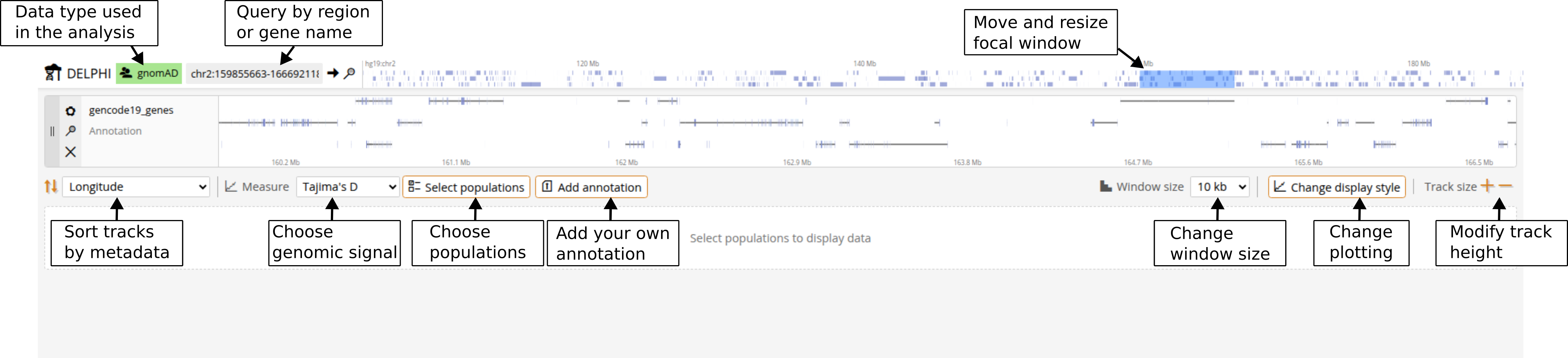
Navigation is similar to other genome browsers. To jump to a specific location, type coordinates in the query box at the top (e.g., chr1:5000000-7000000, commas are fine) or just type a gene name. You can zoom in and out using Ctrl+scroll on any track, or by double-clicking on a region of interest (shift+double click to zoom out). The visible annotation region is determined by the blue rectangle at the top. You can resize and drag it. You can also click and drag the annotation track to pan left or right.
Selecting populations
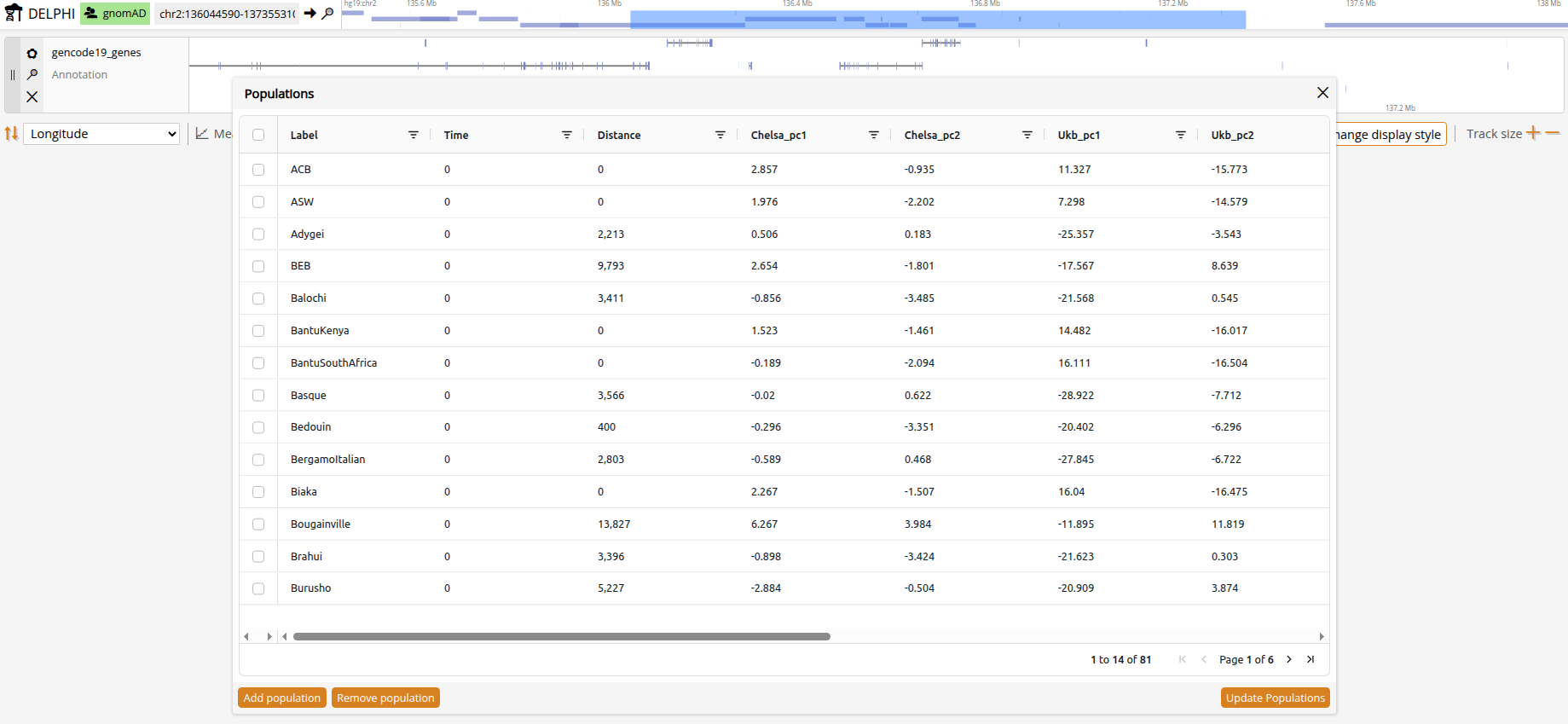
Click to open the population list showing all available populations with their metadata, and filter on any column before choosing. Because there are currently no established clustering methods designed for aDNA, predefined ancient populations were simply clustered by time and geography and are provided to get you started.
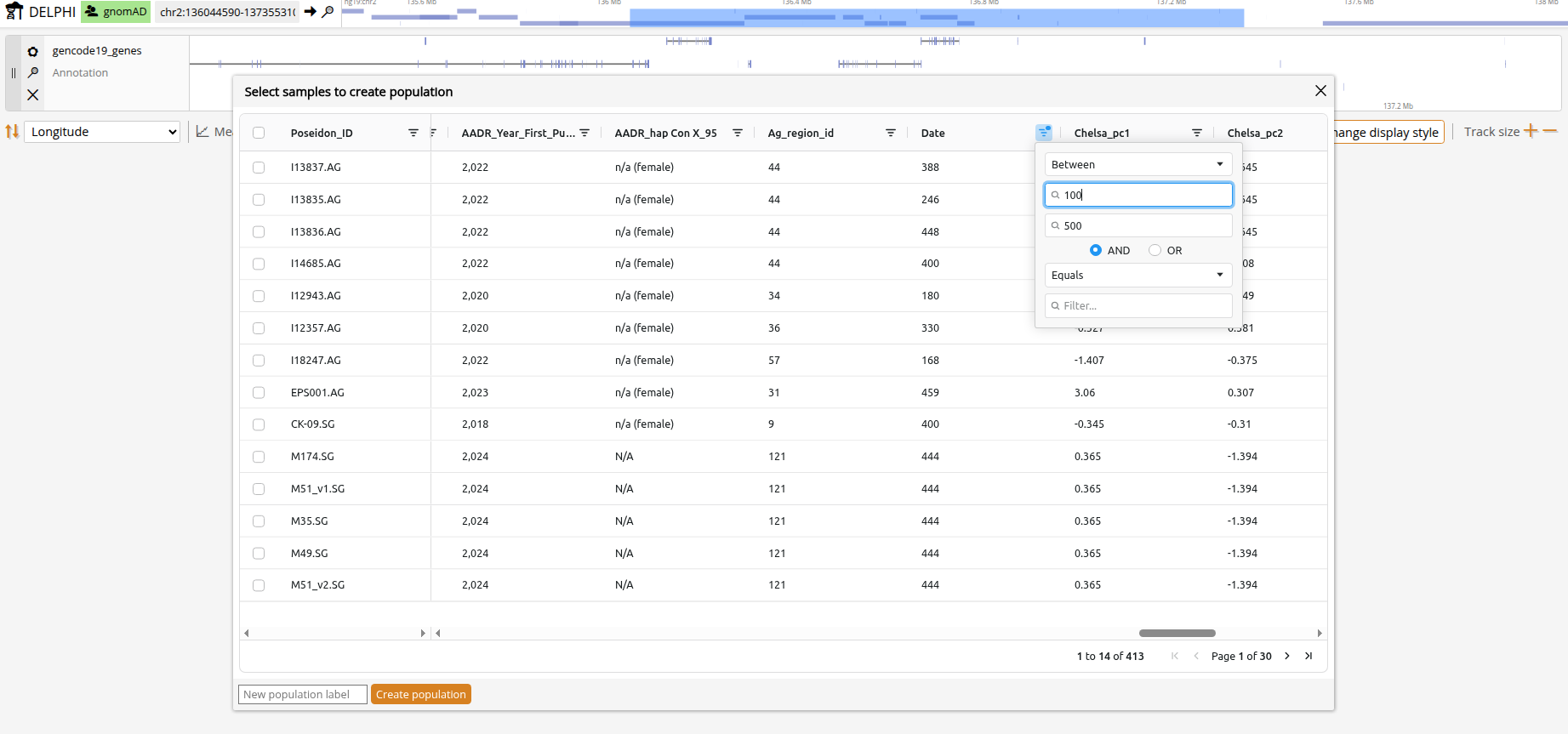
For full flexibility, you can define custom populations by clicking + and filtering the samples by country/time/genetic distance or whatever metadata you'd like. For example, you can group all female samples younger than 500 by marking in the 'Genetic_Sex' column 'contains==F' and in the 'Date' column 'less than==500'. Your new population then shows up at the bottom of the population list with the label you gave it.
Genomic signals
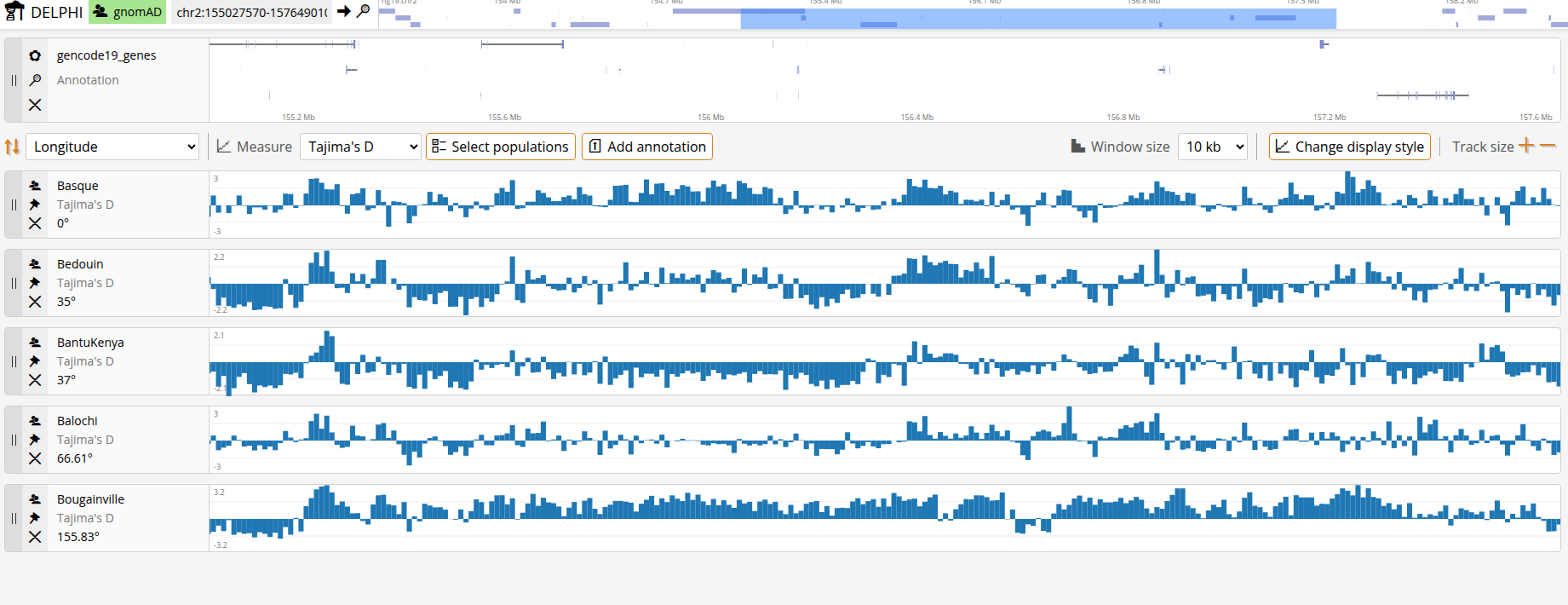
You can change the population genetic statistics shown in the appropriate dropdown. All measures are computed per-SNP and returned in non-overlapping bins of 10 kb, 100 kb or 1 Mb.
Heterozygosity. Expected heterozygosity measures the genetic diversity within a population by quantifying the probability that two randomly chosen alleles at a locus differ from each other. Higher heterozygosity indicates greater genetic diversity. DELPHI computes expected heterozygosity as 2pq, where p is the allele frequency and q = 1-p, calculated separately for each SNP. Allele counts (AC) and allele numbers (AN) are derived from the genotype data for each population, accounting for missing data. The per-SNP heterozygosity values are then aggregated into windows using the mean value across all variants in each window.
Tajima's D. Tajima's D is a statistical test that compares the average number of pairwise differences between sequences to the number of segregating sites. It is used to detect deviations from neutral evolution. Negative values suggest an excess of rare alleles (positive selection or population expansion), while positive values indicate an excess of intermediate-frequency alleles (balancing selection or population contraction). DELPHI computes Tajima's D by comparing observed genetic diversity patterns to neutral expectations.
Fu and Li's F*. Fu and Li's F* is a site-frequency-spectrum neutrality test that contrasts nucleotide diversity (π) with the number of singleton variants (ηs) among segregating sites (S). Because ancestral states are not required, DELPHI computes the no-outgroup version (F*) using minor-allele singletons. Negative values indicate an excess of singletons relative to π (positive selection or population expansion), whereas positive values indicate a deficit of singletons (balancing selection or population contraction). DELPHI derives allele counts and allele numbers per SNP from the genotype data (accounting for missingness), defines singletons as variants with minor allele count = 1, and computes F* from window-level aggregates; windows with fewer than 3 segregating sites are left empty.
FST. Fst is a pairwise statistic that measures genetic differentiation between populations by quantifying the proportion of total genetic variance that is due to population structure. Values range from 0 (no differentiation) to 1 (complete differentiation). Higher Fst values indicate greater genetic distance between populations. DELPHI computes Fst per-SNP using Weir and Cockerham's method, which accounts for differences in sample sizes and provides unbiased estimates. The estimator can return negative values which are clamped to 0. Allele frequencies are calculated for each population from the genotype data, and Fst is computed by comparing the variance in allele frequencies between populations relative to the total variance. Values are then aggregated into windows by averaging across SNPs.
Metadata
Samples and populations in DELPHI have rich metadata information that enables you to interpret results on the spot. You can use it to sort the population tracks and define populations. The metadata include:
- Geographic coordinates (latitude and longitude ranges)
- Waypoint distance from Africa (distance by migratory routes, excluding large bodies of water)
- Date (0 for modern samples)
- Climate variables from CHELSA-TraCE21k, a high-resolution climate dataset. We use a PCA-based summary in which PC1 reflects temperature-related variation and PC2 reflects precipitation-related variation.
- Genetic similarity. Based on UK Biobank PCA distance.
- Sociocultural transitions. The onset of the Neolithic Revolution and the rise of urbanized societies. Taken from the ArchaeoGLOBE database.
With multiple populations selected, you will have multiple data tracks displayed simultaneously. To identify potential explanatory variables, you can sort tracks based on various metadata using the Sort dropdown.
You can also grab the handle on the left edge of a track and drag it where you want it.
Individual samples carry more fields than the population summary, including genetic sex, country, and further sociocultural variables such as foraging and pastoralism onset.
Adding annotations
DELPHI has a large catalog of built-in curated annotations that help you integrate all relevant information into a single exploratory tool. Click to open the annotation catalog. Filter and select the tracks you want to display, or click "Upload from computer" to load your own in GTF, GFF3 or BED format. These files can represent, for example, transposable elements/repeats, promoters/enhancers, non-coding RNAs, CpG islands/UTRs, variant or CNV intervals, conserved elements, or experimental peak tracks (e.g., ChIP-seq). Uploaded tracks are added to the annotation list and are stored in your browser, so they are still there when you come back. Annotation tracks have arrows on the sides for jumping across hits outside the current view, which saves hunting for sparse features by hand.
Extra features
- Browser mode is shown by the label next to the logo. With modern gnomAD populations only, DELPHI is computed on full genotypes. When ancient populations are introduced, the statistics are computed on the 1240K SNP panel, and the data is sparser.
- Export writes a tsv file of the data, one row per bin with the genomic position in the first column and one column per displayed track, or of the metadata, one row per displayed population with all of its metadata.
- Window size sets the bin size of the plots.
- Display style cycles the plots between binned bars, a line and a scatter.
- Y-axis autofits to the data or takes a scale you fix manually.
- Guides draws vertical lines across all tracks.
- Track size makes tracks taller or shorter.
- Gene banding marks a gene across all tracks when you click it.
- Reset returns every control to its default.